
You had your day mapped. Stop for fuel, cut twelve yards, and head home by four. Then a text comes in: “Can you skip us this week?” Maybe it was rain or a customer who forgot they needed to cancel for the week.
I mean dude, it’s super frustrating. I’ve been there multiple times. Often times you might just be rained out. Other times it’s the same repeat offender customer who asked you to skip their yard again...
But honestly, last-minute changes are normal in lawn care. This guide is for my fellow lawn care business owners. How to stay professional with customers, protect your schedule, and handle these last minute changes to your mowing schedule.
Know what kind of change you are dealing with
- Customer skip. A customer doesn’t want a mow this cycle. Just push their next mow date forward and don’t bill for the week.
- Customer reschedule. They still want service, just not today. This one is a bit trickier as you have to figure out when and where you can fit them in.
- You need to move them. This is when you run into some rain, equipment failures, illness, or a day that is simply overbooked. You owe them a heads-up and a clear new day.
Why cancellations feel so personal (and why they’re not)
You’re not crazy for getting annoyed. A cancelled job is lost revenue, wasted drive time, and sometimes a slot you could have given someone else. Small operators often feel it more because you handle everything yourself.
Most customers are not trying to wreck your week. Life happens. Kids get sick, trips get booked, budgets tighten for the month. Your job is to respond in a way that keeps the relationship and keeps your route do-able.
How to respond to the customer when they cancel
Keep your tone professional: direct, friendly, and concise so you can get back to mowing.
- Assume good intent once. First late cancel gets grace and a clear next date. Patterns get a deeper conversation.
- Name the next step. “No problem, I moved you to next Tuesday” will always beat a paragraph about your wasted drive time.
- Offer one alternative, not five. Pick the day you are already in their area. Let them reply if it truly does not work.
- Do not negotiate in real time while you’re mowing. “Got your message, I will confirm your new day in the next hour” is fine.
- Match communication channel to customer. Text for most people. Call only when tone is fragile or the yard is high maintenance.
Customer skip (same week)
“Hi [name], thanks for the heads-up. I will skip this week and plan you for [next date] on my normal route. No charge for today. Reply if that date doesn’t work for you.”
You need to move them
“Hi [name], I need to shift your mow from [old day] to [new day] because [rain / equipment / backlog]. Let me know if [new day] doesn’t work and I’ll find the next available slot to swing by.”
Repeat last-minute cancels
“Hi [name], I want to keep you on the route, but late changes are tough on a one-truck schedule. Can we lock in your normal week, or would bi-weekly on [day] work better? Happy to talk for a minute.”
If you have bad customer who is more work than they’re worth you can always politely let them know you’re no longer able to cut their grass.
Set a simple policy before you get angry
Write three lines in your service agreement or welcome email:
- How much notice you want for a skip or reschedule.
- What happens to billing during skips/cancellations (per visit vs monthly make-up).
- How you notify them when you move the day.
The policy is not about winning an argument with the customer. It gives you something calm to point at when an argument arises with your client. Customers respect clarity.
Protect the rest of your week
After you send the text, fix the schedule, not just your mood:
- Update the yard’s next date immediately. If it stays in your head, you will drive there Thursday or bill the wrong week.
- Pull forward one nearby yard if it helps. Only if it is due soon and does not wreck tomorrow.
- When rain moves a whole day, move the whole day. Shifting only the canceled yards while leaving everyone else on Wednesday is how Wednesday becomes impossible. The mowing schedule guide covers due dates and catch-up order.
When to push back (nicely)
You can say no without being rude:
- Same-day reschedule to a day you do not run their area. “I am full that day. I can do [day] or [day].”
- Third skip in a row on a weekly plan. Offer bi-weekly at the bi-weekly price or pause service until they are ready.
Move jobs without rebuilding the whole book
Paper and memory work until they do not. The painful part of a last-minute change is updating one yard without breaking the next date on every other property.
LawnRoute is built for that daily shuffle, not a one-time route drawing:
- Today shows who is due so you see the hole as soon as someone cancels.
- Move pushes a yard to another date while keeping frequency and history on the customer.
- Move up / move down tweaks stop order on the day without replanning the whole route.
- Rain delay previews a wet week and only applies changes after you approve them.
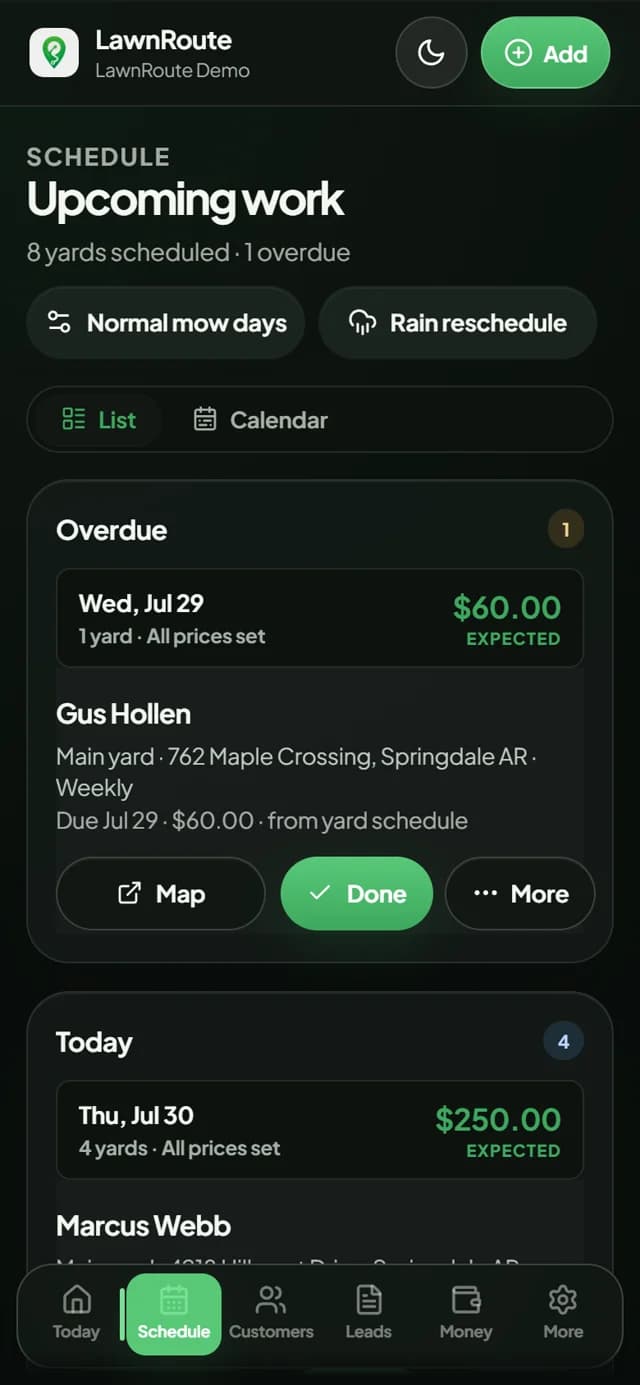
Marking a job done still rolls the next date forward the way the schedule guide describes. No mystery automation. You stay in control of what moved and why.
You can click through a rainy week in the live demo or start free if you want to test moves on your own customer list.
Mistakes that make last-minute changes worse
- Saying yes on the phone and never updating the schedule. That is how you show up to a skip or miss someone who thought they were moved.
- Ghosting the customer. Silence reads as you forgot them, even when you are just underwater.
- Moving one yard but leaving the rest of the rain backlog untouched. Fix the whole affected day when weather is the reason.
- Taking every cancel personally. Save your energy, don’t start a text war.
Bottom line
Last-minute schedule changes will never go away. They get easier when customers know what to expect, when you answer with a clear next date, and when your schedule lives somewhere you can actually edit quickly and easily. Handle the client first, fix the calendar second, and let the rest of the week continue as planned.