
Tracking lawn care revenue can feel... messy. Your bank account shows one big number, but it doesn’t show the mow you finished Tuesday that still is not paid, or the Venmo from last month you never tied to a yard.
What’s really the best way to track lawn care revenue without turning into a part-time bookkeeper?
Log the cut when it happens, split done from paid, and look at what is owed once a week. The software you use for this can really make or break your experience.
I use the LawnRoute app to keep track of all of my mowing revenue. If you forget to request payment from a client you may never get paid just because you lost track. LawnRoute helps you keep track of all your weekly mows and who still owes you after a mow.
1. Track these three numbers
Pick one day each week and write down three totals:
- Earned: finished mows this week times the price on each yard (work you did).
- Collected: money that actually hit your account this week for those jobs.
- Still owed: mows you already finished but have not marked paid yet.
Your bank balance mixes all three. Revenue tracking using LawnRoute or another software keeps them separate so you know if you had a slow week or a slow-pay week.
2. Use a spreadsheet
You can use a Google Sheet or Excel file like this: customer name, their mow day, a box for each date in the month, a check when you cut it, a dash when you skip it, and a column for paid or not.
That is usually enough to keep track of your first 15 to 30 yards. If you have 40+ yards you will want to use an app to keep track of all of your customers, mow days, and payment.
If you're still a paper/pen type of guy you can always print out the spreadsheet and mark all of this by hand.
3. Use a Lawn Care specific software
There are several lawn care specific softwares and apps available that help you track revenue per customer to keep you from leaving money on the table that potentially could be forgotten.
Some of these include Jobber, LawnBuddy, and LawnRoute.
I of course prefer using LawnRoute to keep track of my yards and revenue.
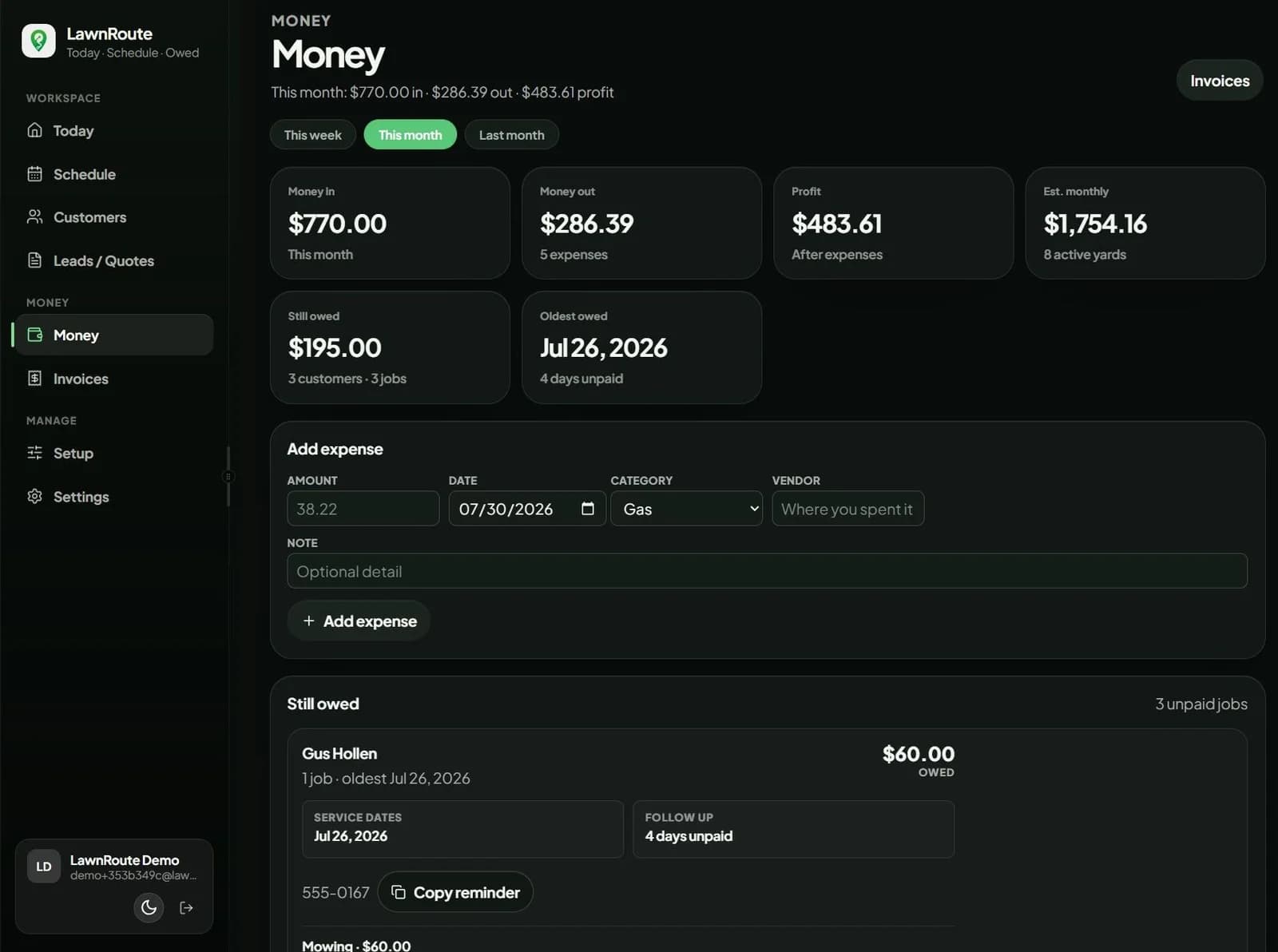
When to use LawnRoute instead of a sheet
I use LawnRoute when the list outgrows the spreadsheet:
- Per-yard price on the record
- Done and paid as separate taps
- Owed list with a running total
- Schedule and payments in one place
Profit after expenses is a second step. Use the profit margin guide, expenses checklist, and profit calculator once earned and collected numbers are added up.
Common tracking mistakes
- Calling your bank balance “revenue”
- Only logging payments, not finished mows
- Waiting until month-end to remember who you cut
- Letting Venmo pile up with no memo and no same-day match
- Mowing customers who are already behind on the last batch
Bottom line
Track lawn care revenue with three weekly numbers: earned, collected, and still owed. Log each mow the day you do it, mark paid when money lands, put names in Venmo memos, and review owed every Friday. Sheet or app does not matter as much as same-day updates.