A lawn care business tracking app tells you who was mowed, who is due next, and who has not paid. Paper and spreadsheets work until your route gets tight. These five apps are built to track customers, visits, routes, and money for solo mowers and small crews.
Best lawn care business tracking apps at a glance
| App | Tracks best | Pricing model | Free tier |
|---|---|---|---|
| LawnRoute | Due today, done, owed, route order, day earnings | Flat per account | Free to start |
| Yardbook | Daily job list, schedule, invoice history | Per user on paid tiers | Yes |
| Jobber | Visit status, time on site, job notes and files | Per user | Trial |
| Service Autopilot | Multi-crew stops, visit completion, field forms | Tiered | No |
| LawnPro | Customer list, schedule, basic billing status | Tiered | Limited free |
Dollar prices omitted. Check each vendor’s site for current rates.
1. LawnRoute: track due yards, done work, and who owes you
Best for: Owners who live in Today: who is due, mark done, check owed, move on.
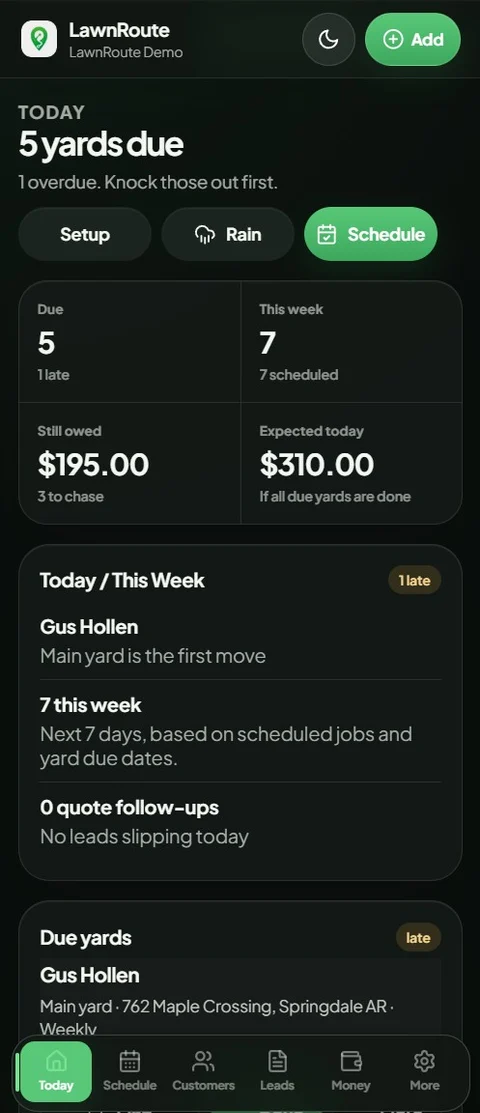
You add a yard once with how often it gets mowed and the next visit date. After that the app tracks the cycle for you. Mark done when you leave and the next date rolls forward. Skip marking done and your schedule lies to you by Friday.
- Today screen for due, overdue, and expected earnings for the day
- Mark done so completed visits update the schedule
- Owed tracking for unpaid work after a visit
- Weekly and monthly totals from jobs you marked
- Route and suggested order for the stops you planned
- Rain delay when you need to shift what you were tracking for the week
Flat pricing for the account, not per helper seat. Free to start.
Pricing model: Flat per account. Free tier: Free to start. Pricing · Start free · Demo · Best lawn care software
2. Yardbook: track the day’s job list and customer history
Best for: Tracking today’s visits and past invoices without paying on day one.
Yardbook keeps customers, scheduled work, and billing in one record. On the phone you open jobs for the day and work down the list. It is less focused on a single Today earnings view than LawnRoute, but it has tracked lawn routes for years.
- Jobs list and map for what is scheduled today
- Customer history for past visits and invoices
- Schedule changes when a yard skips a week
- Estimates and invoices tied to the same customer file
Interface feels older. Free tier has limits; paid plans add per-user pricing.
Pricing model: Per user on paid tiers. Free tier: Yes. LawnRoute vs Yardbook · Yardbook
3. Jobber: track visit time and job status in the field
Best for: Tracking time on site, visit completion, and job files when you also sell extra services.
Jobber shines when each stop is a tracked visit: start timer, run a checklist, attach photos, mark complete. That is useful if helpers need proof of work or you bill by the visit. It is more software than a solo mower needs if you only track “mowed or not mowed.”
- Visit status from scheduled through complete
- Timer and checklist on the job screen
- Notes, photos, and files stored on the customer
- Follow-up automations when a visit finishes
Per-user pricing. Setup time is real if you turn on quoting and automations.
Pricing model: Per user. Free tier: Trial. LawnRoute vs Jobber · Jobber pricing
4. Service Autopilot: track crews and stops at scale
Best for: Office staff tracking several crews, stop order, and visit completion on the same day.
Service Autopilot is built when tracking is a team sport: numbered stops, map view, status per visit, forms in the field. One truck mowing the same neighborhoods does not need this depth. Three crews and a dispatcher often do.
- Numbered route stops in list and map view
- Visit status (finished vs not started) per stop
- Complete work flow on mobile
- Field forms for equipment and checklists
Long onboarding. Not a fit for a solo book of residential mows.
Pricing model: Tiered. Free tier: No. LawnRoute vs Service Autopilot · Service Autopilot
5. LawnPro: simple customer and schedule tracking on a budget
Best for: Tracking who you mow, when they are next due, and basic billing without a big platform.
LawnPro is lawn-specific tracking at low cost. You get customer records, a schedule, and invoices. Mobile is usable but not as smooth as newer apps. The free tier only fits a small customer count.
- Customer and property list with service schedule
- Next visit tracking for recurring mows
- Invoices linked to completed work
- Low monthly cost on paid tiers
Weaker mobile experience. Tight limits on the free plan.
Pricing model: Tiered. Free tier: Limited free. LawnRoute vs LawnPro · LawnPro
Need full software comparisons (quoting, installs, seven vendors)? See best landscaping software for small businesses. This list stays focused on tracking the route and the money week to week.
FAQ
What is the best app to track a lawn care business?
Pick something you will open in the truck. For recurring mowing, that usually means a Today list, mark done, and an owed screen. LawnRoute is built for that loop. Yardbook and LawnPro are common if you want free or cheap and can live with older interfaces.
How do I track who owes me for lawn care?
When you finish a yard, mark it done in your app and tie the visit to a price. Unpaid work should show up on an owed or unpaid list. If you only track in QuickBooks once a month, you will forget who paid cash on Tuesday.
Can I track my mowing route on my phone?
Yes. Lawn apps show today’s stops in a list or map. LawnRoute also shows suggested order for the day. No app fixes a route you spread across three towns. Tracking helps you run the plan you already made.
Is a spreadsheet enough to track lawn care customers?
For ten yards, sometimes. At thirty plus weekly accounts you start missing next mow dates, rain moves, and partial payments. The spreadsheet is always out of date by Thursday.
Are there free lawn care business tracking apps?
Yardbook has a real free tier. LawnPro has a limited free option. LawnRoute is free to start. Read customer caps on free plans before you import your whole book.
Should I use QuickBooks to track lawn care jobs?
QuickBooks tracks money for taxes. It does not tell you who is due before your first stop. Use field software for the week, QuickBooks for the books.
What should a lawn care tracking app include?
Customers and yards, next service date or mow frequency, a clear today or week view, mark done, and who owes you. Everything else is optional until you grow into it.
Bottom line
If tracking means knowing who is due today and who owes you after mark done, start with LawnRoute. Yardbook or LawnPro if free or cheap matters most. Jobber or Service Autopilot when visit-level tracking and office workflows matter more than a simple mow list.